April 25, 2026
15
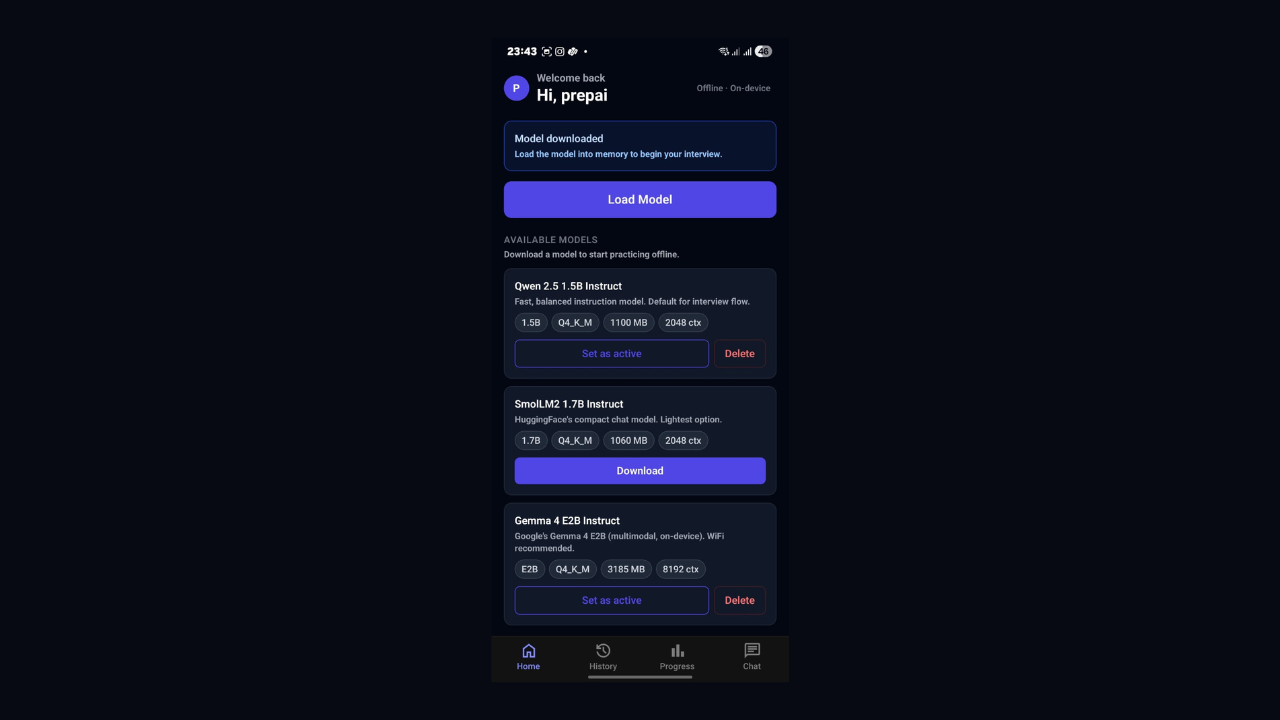
On-Device AI Powered Interview – Using Qwen 2.5 1.5B Q4_K_M & Gemma 4
On-device AI on mobile isn't an experiment anymore—it's production-ready. I'm sharing what I learned running a small language model directly on an Android phone using llama.rn. No cloud, no API costs. Just a quantised model living on the device and responding in real time. If you're curious whether this is actually viable for a real app, here's the honest answer.
On-Device AI on Mobile Using llama.rn — What I Learned
For a while, mobile AI meant one thing: call an API, get a response, show it to the user. The model always lived on someone else's server, behind a billing dashboard, needing a decent internet connection to do anything useful.
I spent a weekend testing whether that had to be true. I wanted a small language model running directly on an Android phone — not a demo, not a proof of concept, but actually powering a working app. No cloud. No API key. No data going anywhere.
It works. And it is more usable than I expected going in.
Why Bother Running AI on the Device
The privacy angle is the obvious one. When the model runs on-device, nothing the user types or says touches a server. For anything involving personal context, that stops being a nice-to-have and becomes the actual point.
Cost is the less obvious one. Cloud inference charges per token. If your app generates a lot of back-and-forth conversation, those costs add up fast. On-device sidesteps this — the user's own chip does the work. You can offer unlimited usage, and your infrastructure bill does not move.
Offline reliability is the third thing worth mentioning. Spotty train WiFi, hotel networks, basement offices - on-device AI runs wherever the phone runs. No network dependency, no failure mode tied to connectivity.
The honest tradeoff: smaller models, a big one-time download, and a minimum device requirement. On low-end hardware, the experience falls apart. That constraint needs to be acknowledged upfront in the app, not buried in fine print.
The Model: Small Is Enough
I used Qwen 2.5 1.5B — 1.5 billion parameters, instruction-tuned. GPT-4 has hundreds of billions of parameters. Qwen 2.5 1.5B is tiny next to that.
But model size only matters relative to what you are asking it to do. For a focused task in English - following structured instructions, staying on topic, producing consistent output — a 1.5B model genuinely holds up. It is not trying to do everything. It does one job, and it does it well.
The model file from Hugging Face is in GGUF format, quantised to Q4_K_M. Quantisation is what makes on-device practical. The raw model at float32 precision would need several gigabytes of RAM. Q4_K_M stores weights as 4-bit integers instead of 32-bit floats and gets the whole thing down to around 1.1GB. For instruction-following tasks, the quality difference is barely noticeable.
That 1.1GB file is the entire brain of the app. It sits in local storage. It never moves.
The Runtime: llama.rn
The library doing the work here is llama.rn — a React Native bridge to llama.cpp, which is the C++ inference engine most people use for running GGUF models locally.
llama.cpp handles the heavy computation in native C++. llama.rn exposes that to your TypeScript code through a usable API.
You need Expo Bare Workflow for this — not managed. The reason is that you need access to the native Android build to compile the C++ layer. Expo managed will not let you do that without ejecting.
Initialization:
import { initLlama } from 'llama.rn'

const context = await initLlama({
  model: '/path/to/model.gguf',
  use_mlock: true,
  n_ctx: 2048,
  n_threads: 4,
  n_gpu_layers: 20,
})
The n_gpu_layers The parameter matters more than it looks. On Snapdragon devices, it offloads computation to the Adreno GPU, which noticeably improves speed. On a Snapdragon 8 Gen 1 device with Qwen 2.5 1.5B, you get around 7–10 tokens per second — fast enough for a real app.
Streaming a response:
await context.completion(
  {
    prompt: yourPrompt,
    n_predict: 512,
    temperature: 0.7,
    stop: ['', 'User:'],
  },
  (data) => {
    if (data.token) {
      // append token to UI as it arrives
    }
  }
)
Token-by-token streaming matters for how the app feels. Waiting 10 seconds for a full block of text to appear feels broken. Watching text arrive continuously — even at 7 tokens per second — feels conversational. The raw speed is the same; the perception is completely different.
Getting the Model onto the Device
Do not bundle the model inside the APK. A 1.1GB APK will fail app store review and take a long time to install. The right approach is a small APK with the model downloading on first launch.
expo-file-system has createDownloadResumable which handles this. The resumable part is not optional — a 1.1GB download over mobile data will get cut off. Without resumability, the user starts over at 0% every time their connection drops.
After download, verify the SHA-256 checksum against the hash from Hugging Face. A corrupted model file causes confusing, silent failures later. One checksum check after download prevents all of that.
The first launch screen is where users decide if they trust the app. Show the file size, progress in MB, an estimated time remaining, and a clear note that this only happens once. A progress bar that just says "Downloading..." with nothing else will lose a chunk of users right there.
What Surprised Me
Structured JSON output is reliable. Tell the model clearly in the prompt to return only valid JSON with no preamble and no explanation — it does it consistently. Any time you need the AI to return something your app can parse and act on, you can prompt for it directly.
Streaming hides the latency. A 100-token response at 7 tokens per second takes 14 seconds. That sounds bad. But the first token appears almost immediately, so it reads as fast rather than slow. Perception is doing a lot of work here.
Prompts with clear constraints work. "Ask only one question per message" and "do not explain your reasoning" actually hold. Small models have a reputation for going off-script, but with tight, specific instructions, Qwen 2.5 1.5B stays well-behaved.
The Real Limitations
Device floor is non-negotiable. Below 8GB RAM, the experience breaks down — either the model runs out of memory or runs too slowly to use. This is a product constraint to communicate clearly, not something to paper over.
The context window is short. At 2048 tokens, long conversations will start dropping their earliest messages. Design the conversation flow around this from the start.
Cold start takes a moment. First load into memory takes 10–20 seconds. After that, it stays warm through the session, but that first wait needs a loading screen with context — not just a spinner sitting there.
What I Actually Took Away
The thing that shifted for me is not a specific technical trick. It is that AI capability no longer requires cloud dependency. A useful, real AI layer can run entirely on a user's phone — private, offline, and with no per-session cost.
Most mobile AI apps today are still just thin clients over cloud APIs. The developers figuring out on-device architecture now will have a meaningful head start when the rest of the ecosystem gets there.
llama.rn makes it accessible from React Native today. The setup takes some patience, but it is not as far out of reach as it looks from the outside.
Stack: Expo Bare Workflow · TypeScript · llama.rn · Qwen 2.5 1.5B Q4_K_M · expo-file-system · react-native-mmkv