April 5, 2026
8 min
ClipSync: The Clipboard App That Lives on Your Wi-Fi, Not the Internet
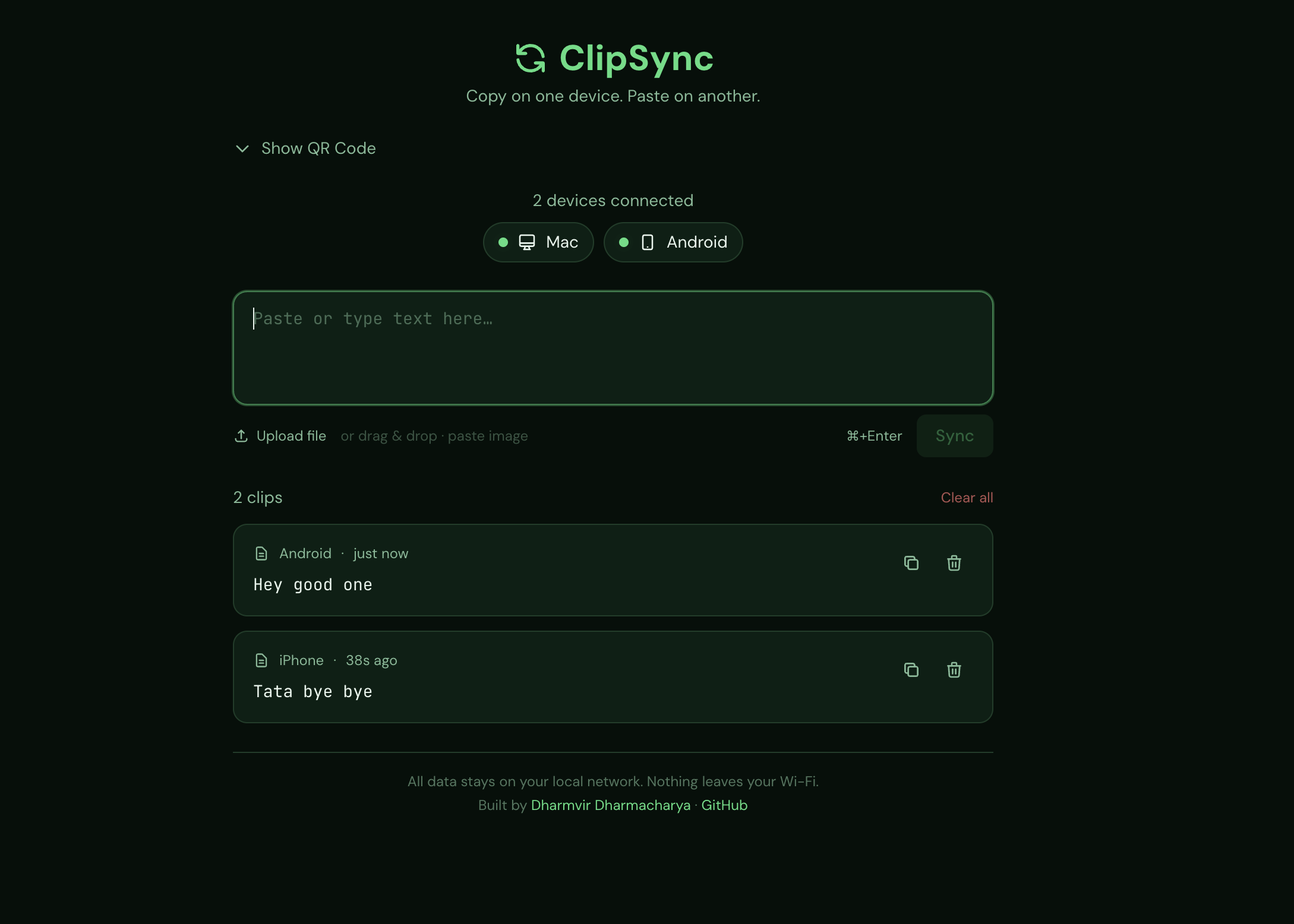
A deep dive into the architectural decisions behind ClipSync — an open-source, zero-cloud clipboard sharing tool. Learn how in-memory storage, delta-sync polling, base64 file handling, and LAN IP detection work together in a real app.
Why Build It Yourself?
Tools like iCloud Clipboard, Pushbullet, and Windows Clipboard History already solve this problem. So why build another one?
Because building it yourself is how you actually learn things.
ClipSync is intentionally small — about 600 lines of TypeScript, no database, no auth layer, no cloud. That constraint forces every decision to be visible. Visible decisions are teachable decisions.
This post walks through six concepts that ClipSync illustrates well. If you're learning web development, system design, or just want to understand how a real app handles files and network communication — read on.
The full source code is open on GitHub. You're encouraged to read along.
You Don't Always Need a Database
Most tutorials reach for a database immediately. ClipSync doesn't have one. The entire data layer is two variables:
// lib/store.ts
let clips: Clip[] = [];
const devices: Record = {};
When the server restarts, everything disappears. That's intentional.
ClipSync is for short-lived, local-network transfers. Nobody needs clipboard history from three days ago. Impermanence is the right behaviour here.
Before adding a database to your next project, ask yourself: Does this data actually need to survive a restart? If the answer is no, in-memory storage gives you speed and simplicity with zero setup cost. A capped array (50 clips, newest first) prevents unbounded memory growth — handled with a single splice().
Takeaway: Start with in-memory storage. Graduate to a database only when you have a real reason to persist data.
Polling vs WebSockets (and Why Polling Won)
Sync is the core technical challenge of any clipboard app. Two approaches exist:
WebSockets — a persistent, bidirectional connection. The server pushes data to clients the instant something changes.
Polling — the client asks the server "anything new?" on a repeating timer.
ClipSync polls every 1.5 seconds. Here's why that was the right call.
WebSockets introduce real complexity: connection state management, reconnection logic, server-side fanout to multiple clients. For a local-network app open in a browser tab, that complexity buys you almost nothing noticeable.
But naive polling — fetching all clips on every tick — is wasteful. ClipSync uses delta sync instead:
GET /api/clipboard?since=1712345678000
The client sends its last-seen timestamp. The server returns only clips newer than that. Each round-trip stays tiny no matter how many clips are stored.
Takeaway: Polling is not a lazy fallback — it's a valid choice under the right constraints. Add WebSockets when you genuinely need sub-second push or server-initiated events that polling can't handle. Identity Without Authentication Every device that opens ClipSync is recognised by name. How? A UUID stored in the browser's localStorage, generated on first visit:
let deviceId = localStorage.getItem("deviceId");
if (!deviceId) {
  deviceId = crypto.randomUUID();
  localStorage.setItem("deviceId", deviceId);
}
The server tracks a heartbeat. Devices ping /api/devices every 10 seconds. Any device silent for more than 60 seconds is removed from the active list. The UI shows only currently-connected devices.
There's no login, no password, no session token. That's a deliberate design decision.
Here's the distinction worth internalizing: identity answers "who is this?" — authentication answers "can I trust who this claims to be?" ClipSync needs the first, not the second, because the trust boundary is your local network, not the application itself.
Takeaway: Identity and authentication are different problems. Only add auth when you're crossing a real trust boundary. localStorage UUIDs are perfectly adequate for client identification in trusted environments.
How Files Move Through a Web Server (Base64)
When you drag a file onto ClipSync, something interesting happens. The browser sends the file as raw binary. The server receives it, converts it to a base64 string, and stores it in memory. When another device downloads it, the server decodes that base64 back to binary and streams it as a file.
Why base64? Because JSON — the standard format for API responses — cannot carry raw binary data. Base64 encodes binary as printable ASCII characters, making it safe to embed in JSON and store as a string.
The cost is real: a 50 MB file becomes roughly 67 MB in memory (base64 adds about 33% overhead). That's exactly why ClipSync hard-caps file size:
// lib/constants.ts
export const MAX_FILE_SIZE = 50 * 1024 * 1024; // 50 MB
For a larger-scale file transfer tool, you'd want to stream files directly to disk and avoid this overhead entirely.
Takeaway: Whenever you handle file uploads in a web app, you're solving the binary-to-text problem. Base64 is the simple solution. Understand its memory cost so you know when to outgrow it.
Making Your Server Discoverable on a Local Network
ClipSync generates a QR code that points to itself. But how does a server know its own IP address?
Node.js has a built-in answer:
// lib/network.ts
import os from "os";

const interfaces = os.networkInterfaces();
// prefer en0 (Mac Wi-Fi), wlan0, then eth0
os.networkInterfaces() Returns all network adapters and their assigned IPs. ClipSync picks the most likely LAN adapter and encodes that IP into the QR code.
The server also binds to 0.0.0.0 instead of localhost:
"start": "next start -H 0.0.0.0 -p 5999"This single change is the unlock for LAN-reachable apps. localhost only accepts connections from the same machine. 0.0.0.0 tells the OS to accept connections on any network interface — so your phone, tablet, or second laptop can all reach the server.
Takeaway: For any tool that needs to advertise itself on a local network, 0.0.0.0 binding + os.networkInterfaces() is the two-step pattern you need.
Security at the Edges
ClipSync has no authentication layer. But it still validates every input. That's not a contradiction — it's a principle.
Validate at system boundaries. Trust internally.
Anything arriving from outside — file names, MIME types, file sizes — gets sanitized before it touches your data layer:
// lib/constants.ts
export function sanitizeFilename(name: string): string {
  return name.replace(/[^a-zA-Z0-9._\-]/g, "_").substring(0, 255);
}

export function safeMimeType(mime: string): string {
  return /^[\w\-]+\/[\w\-+.]+$/.test(mime)
    ? mime
    : "application/octet-stream";
}
A malicious filename like ../../../etc/passwd this becomes .._.._.._.._etc_passwd — harmless. An invalid MIME type falls back to a safe default.
Even on a trusted local network, path traversal attacks, oversized payloads, and unexpected content types are real vectors. The cost of these checks is near zero. The risk of skipping them is not.
Takeaway: Always sanitise at the edge, even in low-threat environments. It costs almost nothing and prevents a whole category of bugs and vulnerabilities.
What This Project Really Teaches
ClipSync doesn't use Kafka, Redis, or Postgres. It uses two arrays, a polling interval, and Node's standard library. And it works well.
The constraints — no cloud, no installs, no database — forced cleaner design decisions than most unconstrained projects produce. Every trade-off has a documented reason. Every shortcut is explicit.
If you want to learn how real apps handle sync, file transfers, and local networking, reading a small codebase that doesn't hide its decisions is one of the most effective ways to do it.
The source is open. Fork it, extend it, break it, improve it. That's the point.
⭐ Star ClipSync on GitHub — contributions and forks welcome.
https://github.com/DDharma/Clipsync/